Mapping Your Spreadsheet for Importing Products into PIM
Product Importing is Currently Under Construction
Written By El
Last updated 2 months ago
During the upload, you will need to map the sheet column names to the system fields. Once everything is mapped, select Import in the top right-hand menu. Imported products are added to your Prodify Product View where you can edit product information and link assets to products.
Prodify's Add Products modal offers two ways to add products: manually, one at a time, or by importing a spreadsheet.
Roles: Editors and Admins can add and import products. Viewer roles have read-only access.
Opening the Add Products Modal
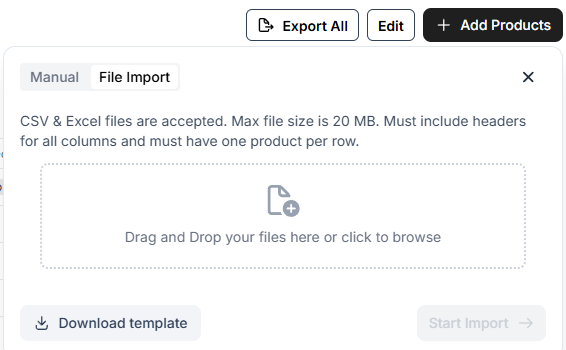
From the Product view, select Add Products in the top right-hand menu. The modal opens with two tabs: Manual and Import.
Manual — add a single Product Family by entering its Product Code and Product Type.
Import — upload a spreadsheet to add multiple products at once.
Preparing Your Spreadsheet
On the Import tab, select Download Template to get a spreadsheet with the correct columns, including Product Code, Product Type, Product, SKU, Assets (via Asset ID), and Description. Fill in your product information, then upload the completed file.
Mapping System Fields
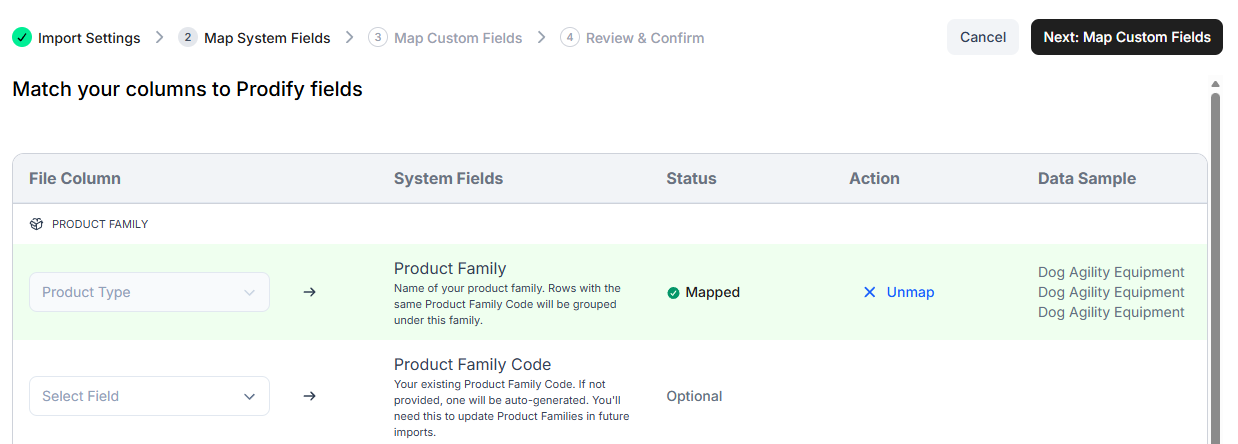
After uploading, Prodify moves to the Map System Fields step, where you match each column in your spreadsheet to a system field in Prodify.
A preview of sampled data from your file appears next to each column, so you can confirm the mapping before continuing.
Optional fields can be skipped or unmapped if you don't want to import them.
Required fields must be mapped before you can proceed — Prodify flags any that are missing.
Import Settings and Preview
The final step, Import Settings & Preview, shows a preview table of your file with the mapped columns applied.
Use the column and decimal separator controls to match your spreadsheet's formatting.
If Prodify detects duplicate SKUs or duplicate columns, an error displays so you can correct your file before importing.
Once everything looks correct, select Import to add your products. Imported products appear in your Prodify Product view, where you can edit product information and link assets.