Group Sharing
No need to share one-by-one as users and roles evolve. Simply add to a group to enable access to the right content.
Written By El
Last updated 4 months ago
Share assets with groups of users that they have created through their share settings in Prodify.
Custom Groups allow you to tailor access to your digital assets in your DAM for smarter, more secure content sharing. Minimize risk by restricting access to sensitive or irrelevant content.
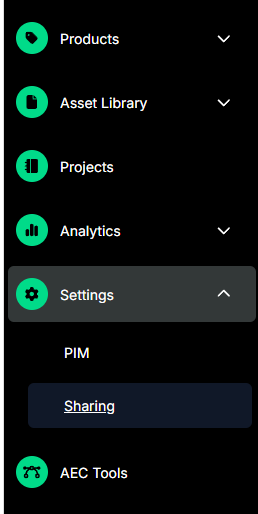
Access the Share Settings under the Settings menu.
Create a group using the Create Group button at the top right.

To add or remove users, open a group. Add members through the Add Member button with the Add Member button at the top right.
To remove a user from a group, click the “X” beside the users name.
Share settings cannot be accessed by Viewers. Editors and Admins have the user permission levels required for creating groups.
Only Admin and Editor roles can create and manage share groups. Guests can be added to groups but cannot create them.